All features

Cloudesk HR & payroll

Your team, their time and their pay — sorted.

Everything a growing Indian business needs to look after its people. Keep every employee's record, let them check in and apply for leave from their phone, run payroll with PF, ESI, professional tax and an income-tax estimate in a few clicks, and hire from your own careers page.

HR and payroll on a phone

Real screenshots from Cloudesk HR, using a demo workspace with 14 demo employees. Their October attendance before today was added as demo data; leave, claims, payroll, hiring and reviews were created through the app.

How it works

Three steps, no surprises

  1. 1

    Add your people

    Name, job, manager, salary and bank details — or bring in your restaurant staff in one click. Invite them and they get their own space to check in, apply for leave and download payslips.

  2. 2

    Let the days run

    People check in and out, apply for leave and file claims; managers approve from their home page. Holidays, weekly offs and late marks are worked out for you.

  3. 3

    Pay everyone

    Pick a month and payroll is worked out from salaries, attendance and approved claims. Add a bonus, finalise, download the bank file and the register, and payslips appear for everyone.

The tour

Every tool, up close.

  1. 01Home

    Start the day knowing who's in.

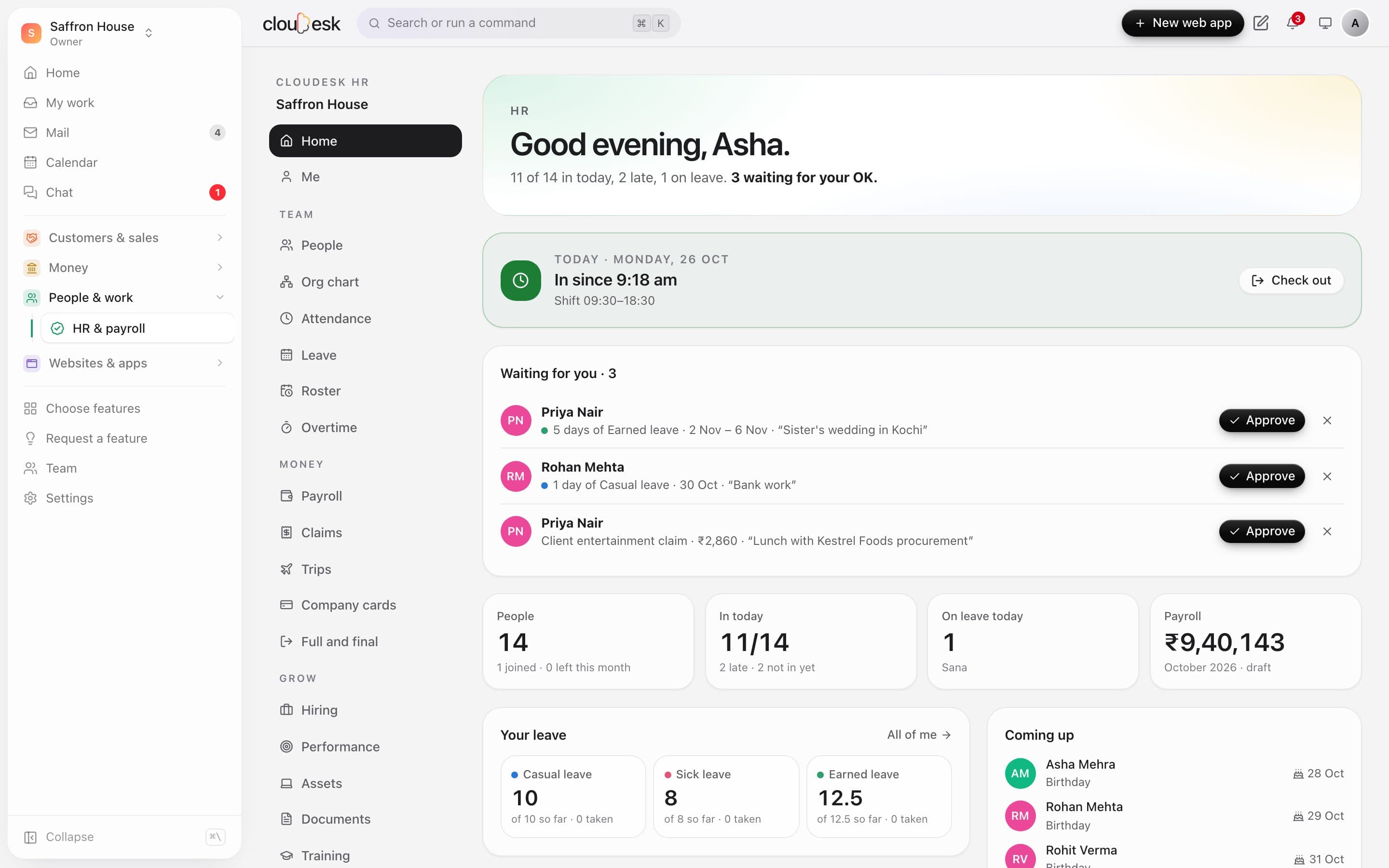
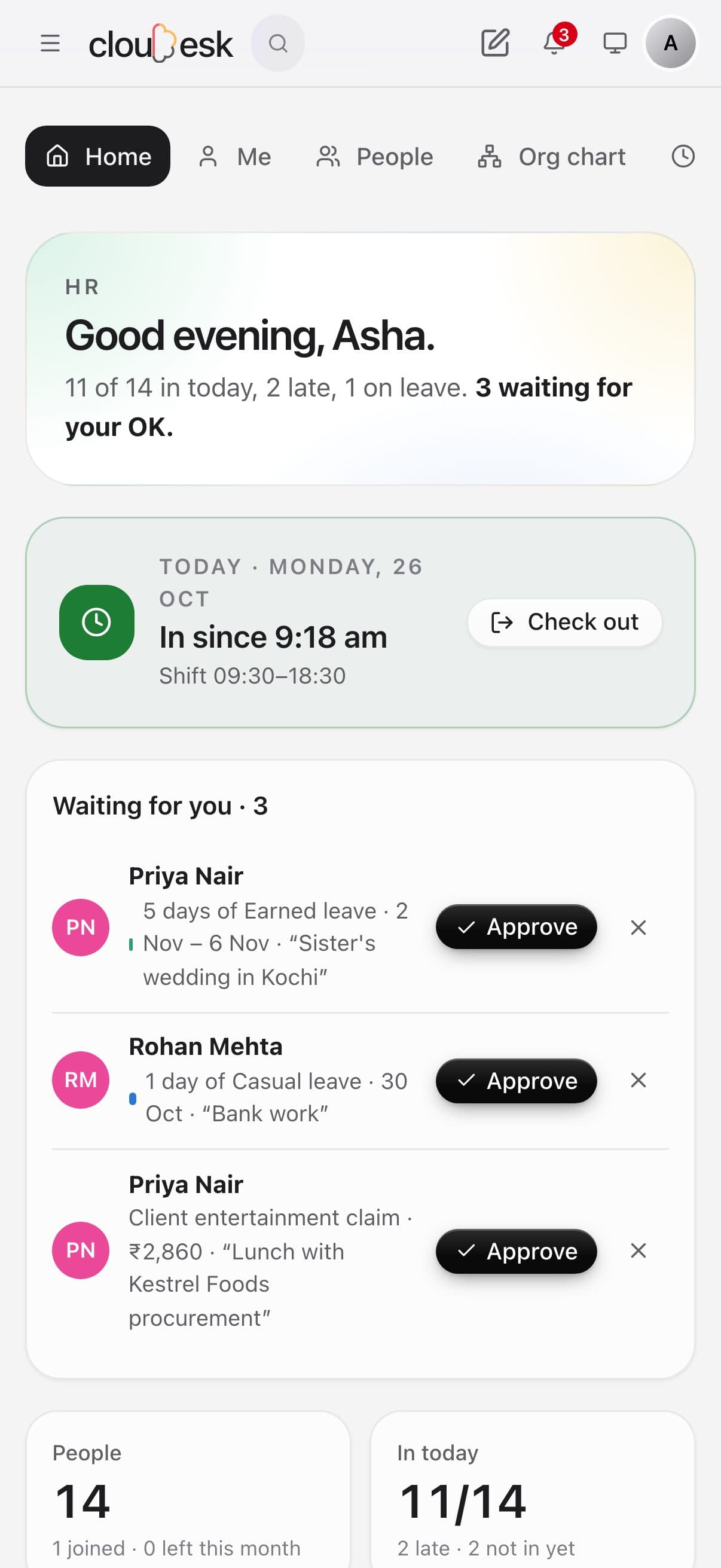
    Everyone lands on a home that fits their role: your own check-in, leave and claims waiting for your OK, who's in, late or off today, the latest payroll, announcements, birthdays, work anniversaries and holidays.

    • Approve leave and claims in one tap
    • Late and not-in-yet at a glance
    • Birthdays and work anniversaries
    • Announcements for the whole team
    The HR home with approvals waiting and today's attendance
  2. 02People

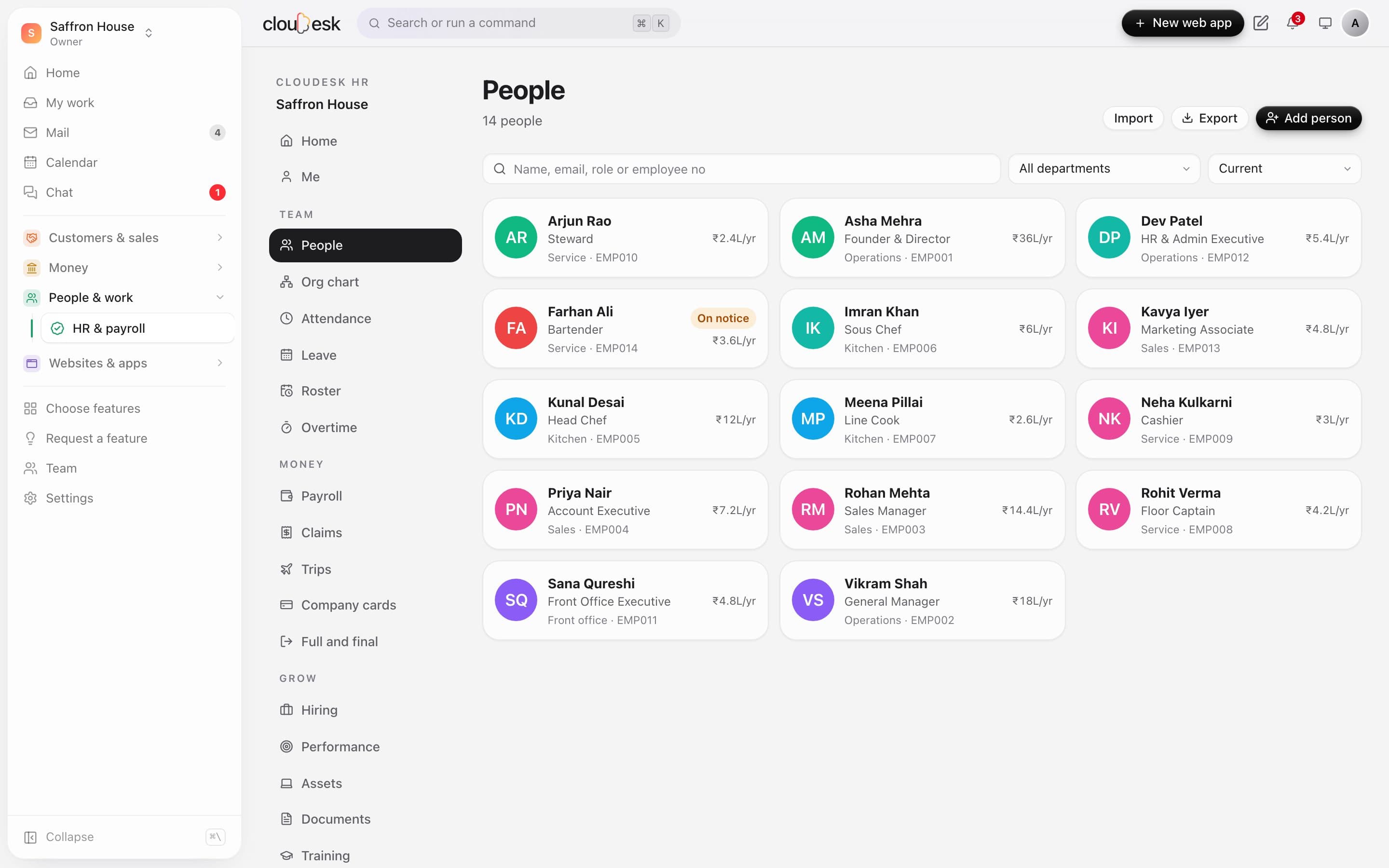
    Every employee, one record.

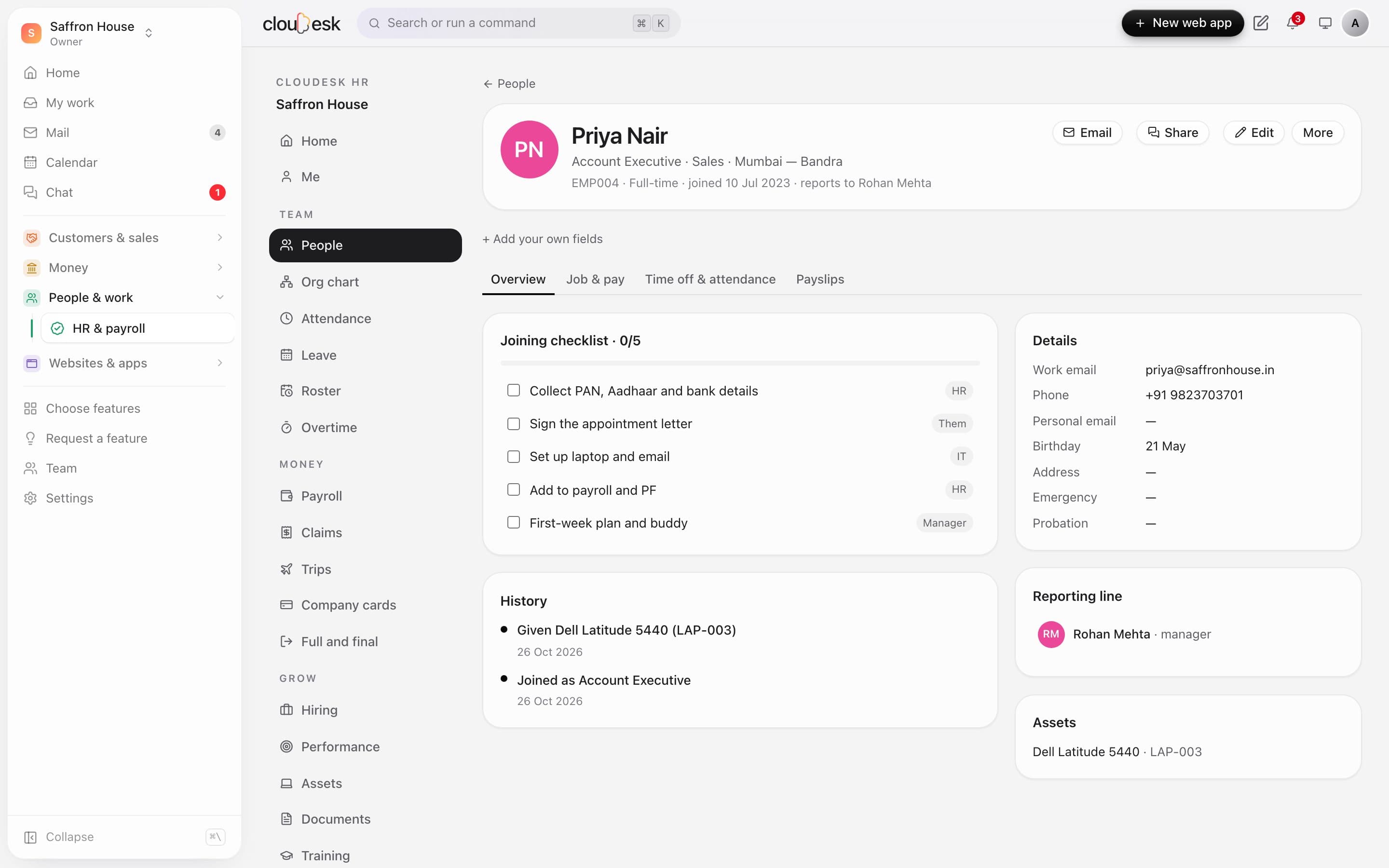
    Job, department, location, manager, probation, salary, bank and statutory numbers in one place, with a history of joins, promotions, transfers and salary revisions. New joiners get a checklist; people who leave get one too.

    • Joining and leaving checklists
    • Promotions and transfers on the timeline
    • Assets they hold
    • Letters from your templates
    Priya Nair's record: joining checklist, history, details and reporting line
  3. 03Org chart

    Who reports to whom, drawn for you.

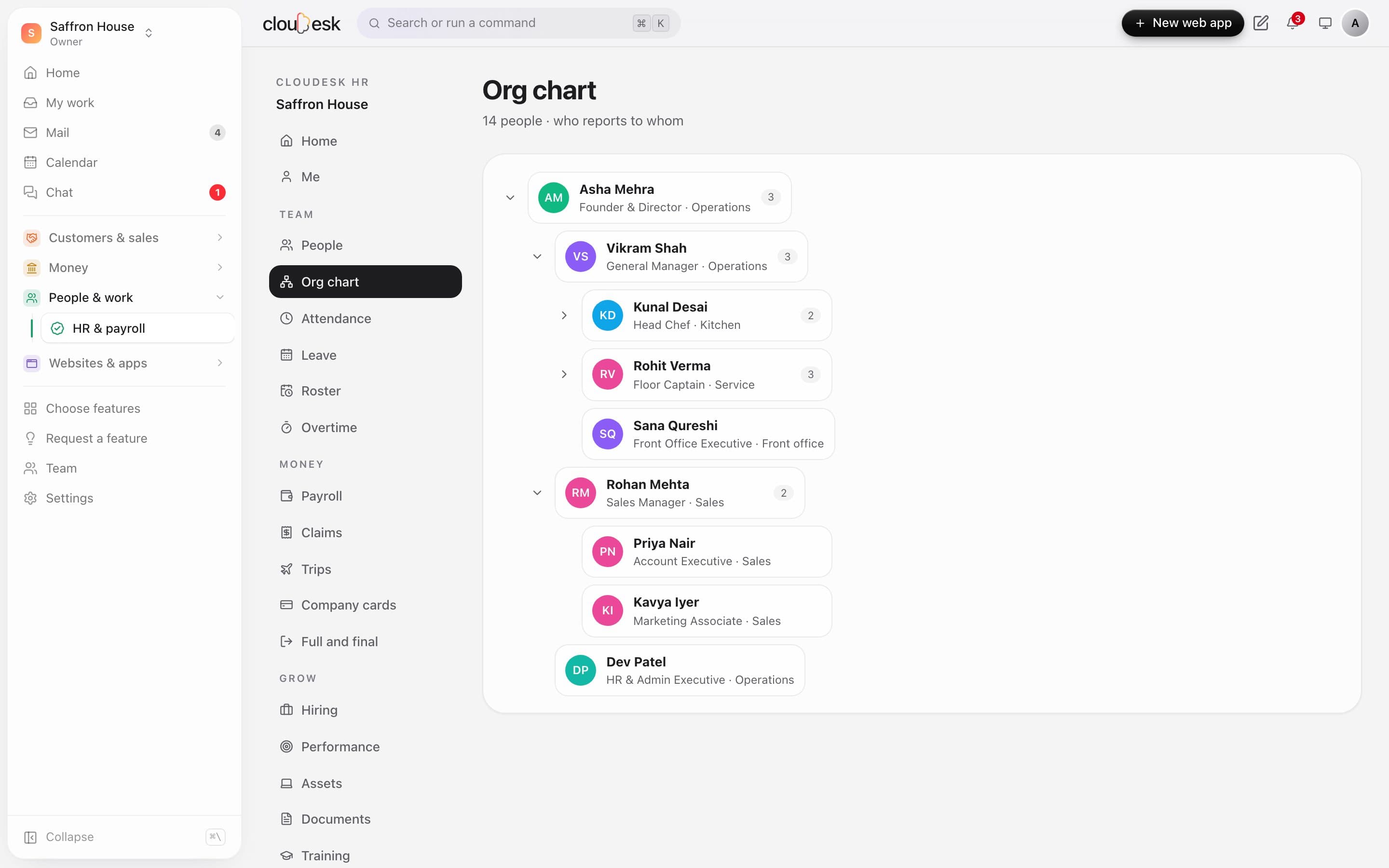
    Set each person's manager and the org chart draws itself. Managers see and approve for everyone below them — and nobody can be made their own boss by accident.

    • Managers approve for their whole team
    • Reporting loops are blocked
    • Click anyone to open their record
    The org chart from the founder down
  4. 04Attendance

    Attendance that adds up by itself.

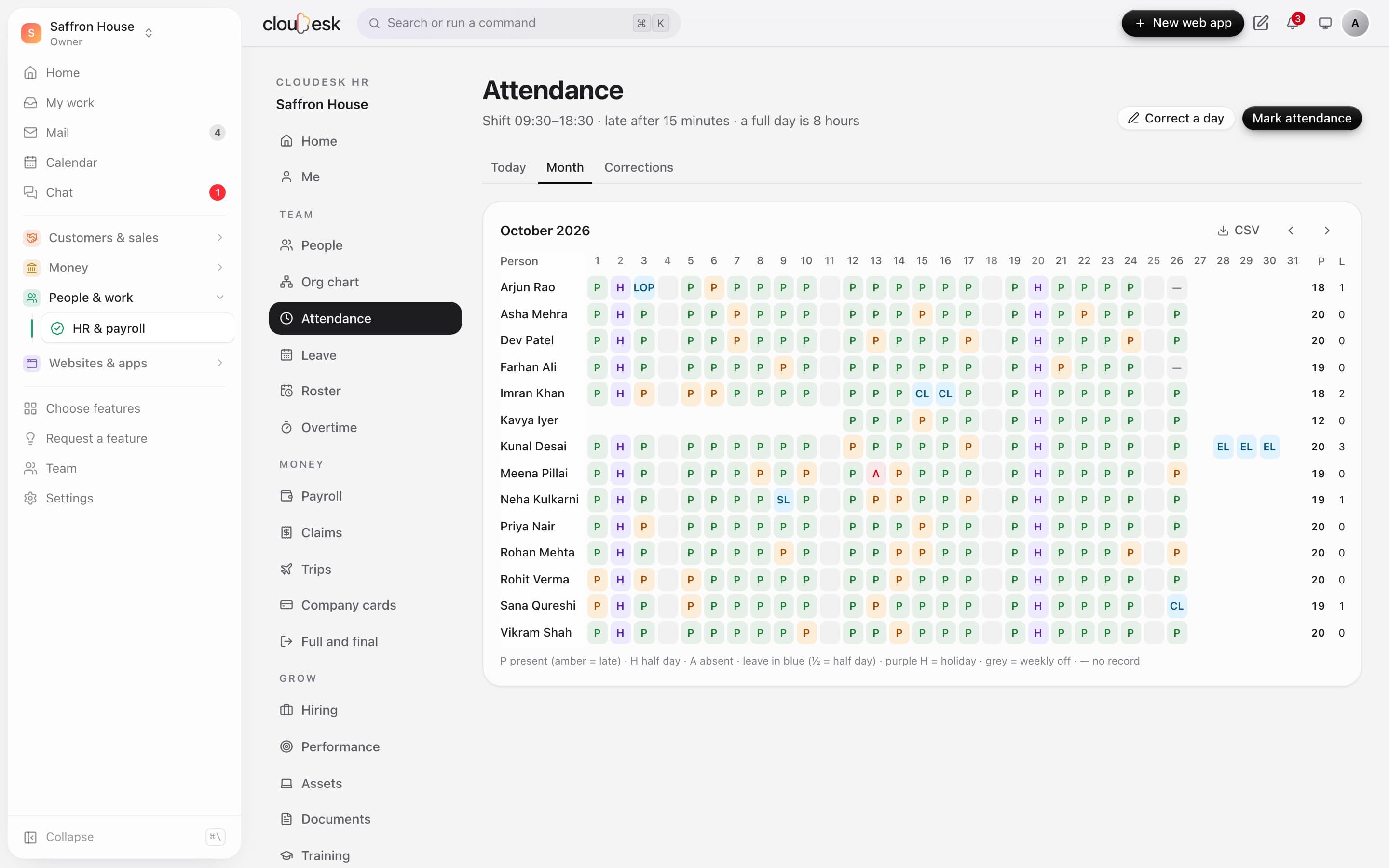
    People check in and out from any browser. Late marks follow your shift and grace period, short days become half days, and the month sheet shows the whole team — present, late, leave, holiday, weekly off and absent.

    • Your shift, grace period and full-day hours
    • Corrections people can request
    • Horeca till unlocks count as check-ins
    • Download the month as CSV
    The month attendance sheet with present, late, leave, holidays and absences
  5. 05Leave

    Leave without the back-and-forth.

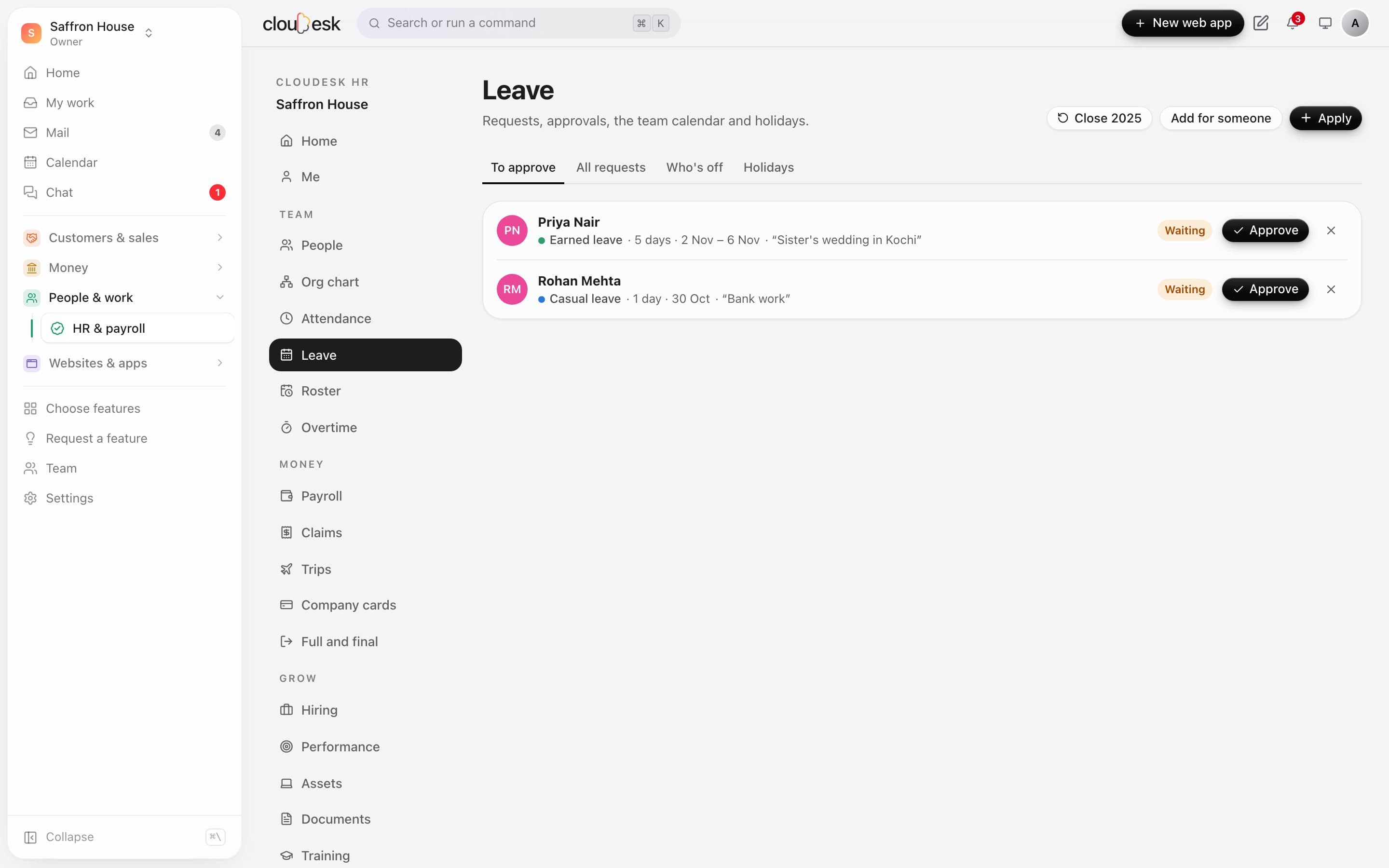
    Your own leave types with yearly or monthly accrual and carry-forward. Balances are live, clashes are caught, the manager gets an email, and the who's-off calendar and holidays are a tab away.

    • Casual, sick, earned and unpaid out of the box
    • Half days
    • Add leave for someone — approved at once
    • Close the year with carry-forward
    Leave requests waiting for approval
  6. 06Self-service

    A space of their own for every employee.

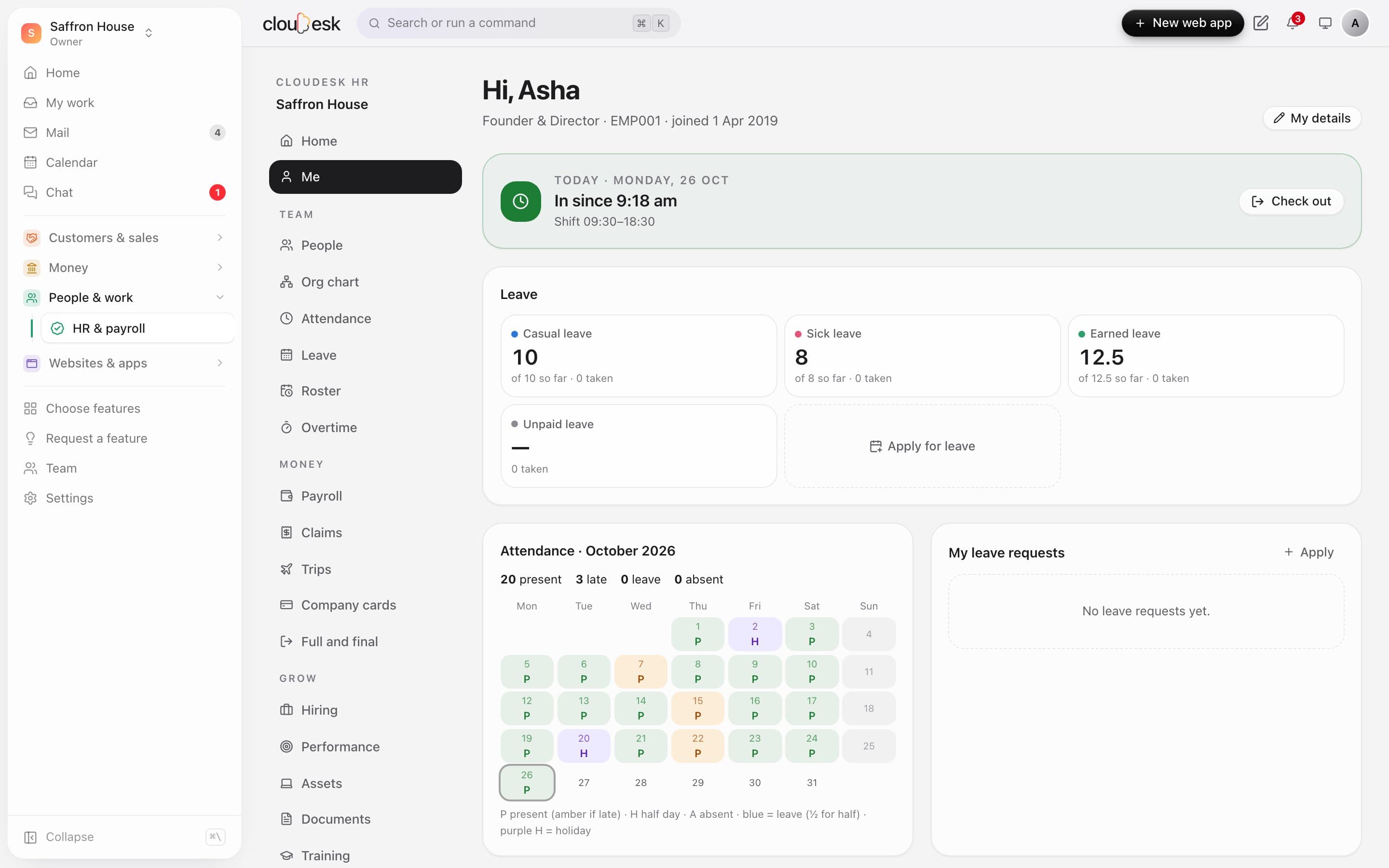
    Invite people with the Employee role and they see only their own HR: check in, balances, their month, leave requests, claims and payslips — and they can update their phone, address and bank details themselves.

    • Check in from a phone
    • Apply for leave and file claims
    • Download payslips
    • No access to your projects, store or CRM
    An employee's own space: check-in, leave balances and attendance for the month
  7. 07Payroll

    Payroll in a few clicks, not a few days.

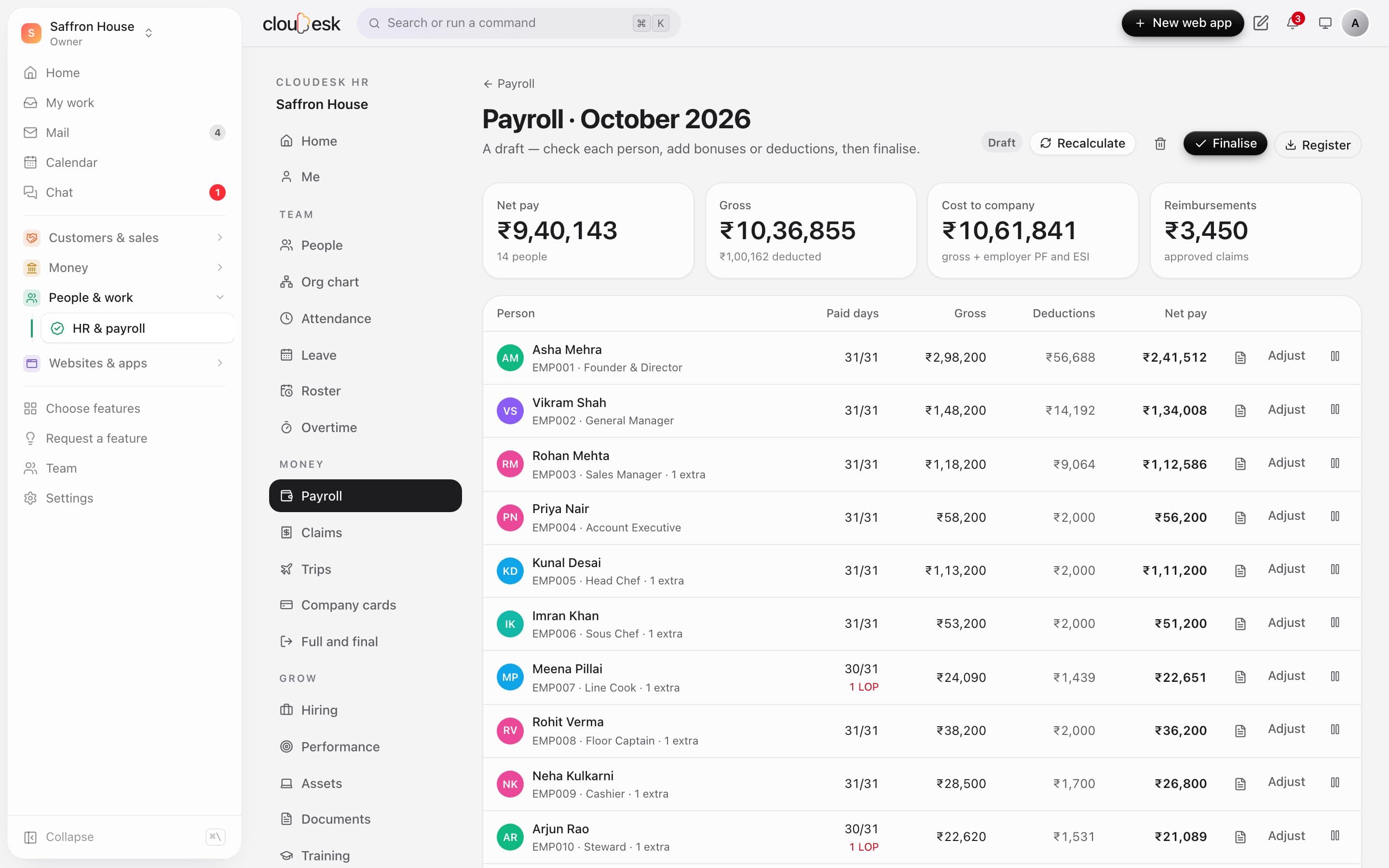
    Pick a month and everyone's pay is worked out from their CTC, attendance and unpaid leave, with PF, ESI, professional tax and an income-tax estimate. Add bonuses or deductions, hold anyone's salary, then finalise.

    • Loss of pay from attendance
    • Approved claims paid with salary
    • Salary register CSV
    • Bank transfer file
    October's payroll run with each person's paid days, gross, deductions and net pay
  8. 08Payslips

    Payslips everyone can open.

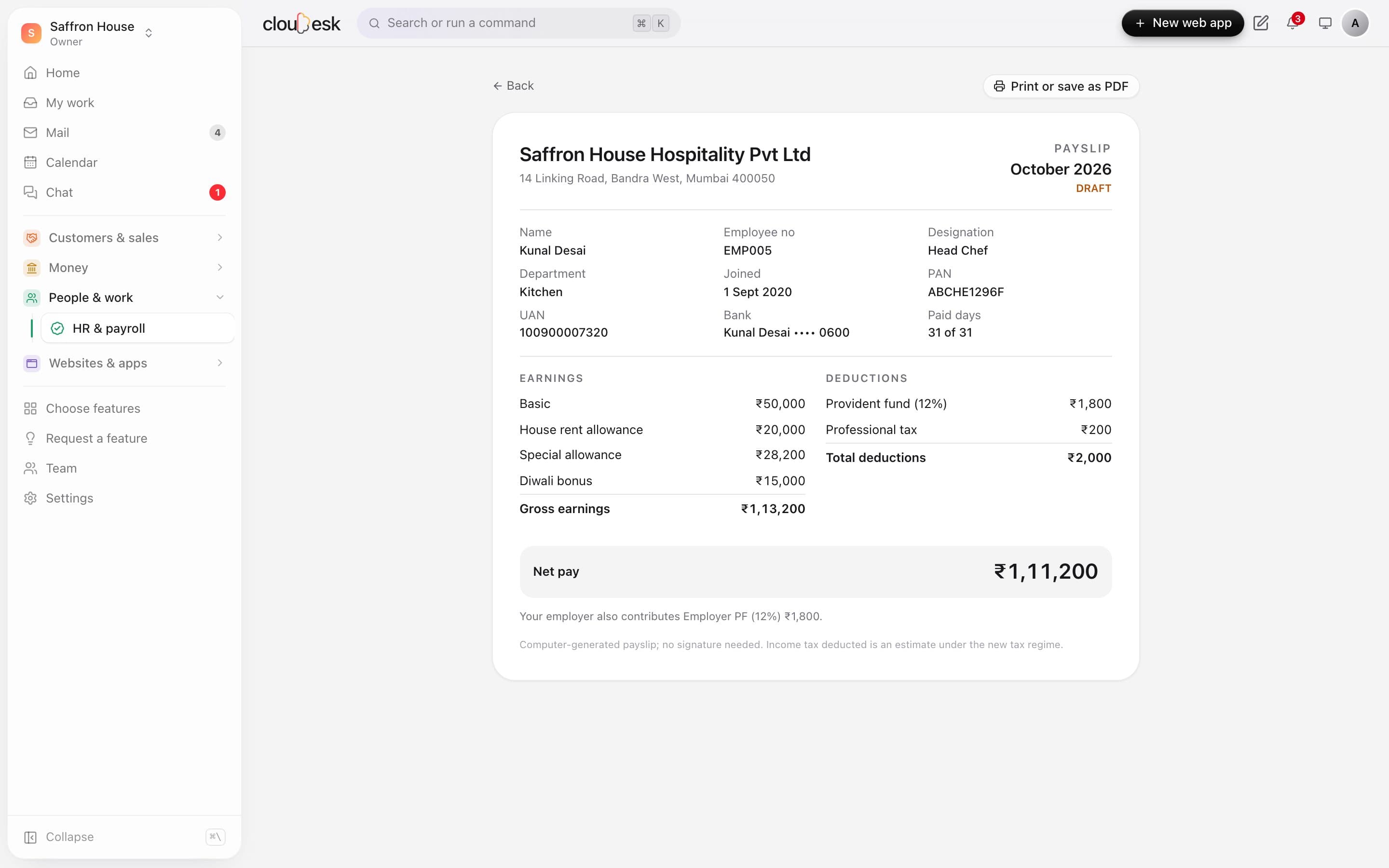
    A clean, printable payslip with earnings, deductions, paid days and the employer's PF and ESI — visible to the employee in their own space the moment you finalise.

    • Print or save as PDF
    • Masked bank account
    • Bonuses and claims as their own lines
    Kunal Desai's payslip for October 2026 with a Diwali bonus
  9. 09Hiring

    Hire from your own careers page.

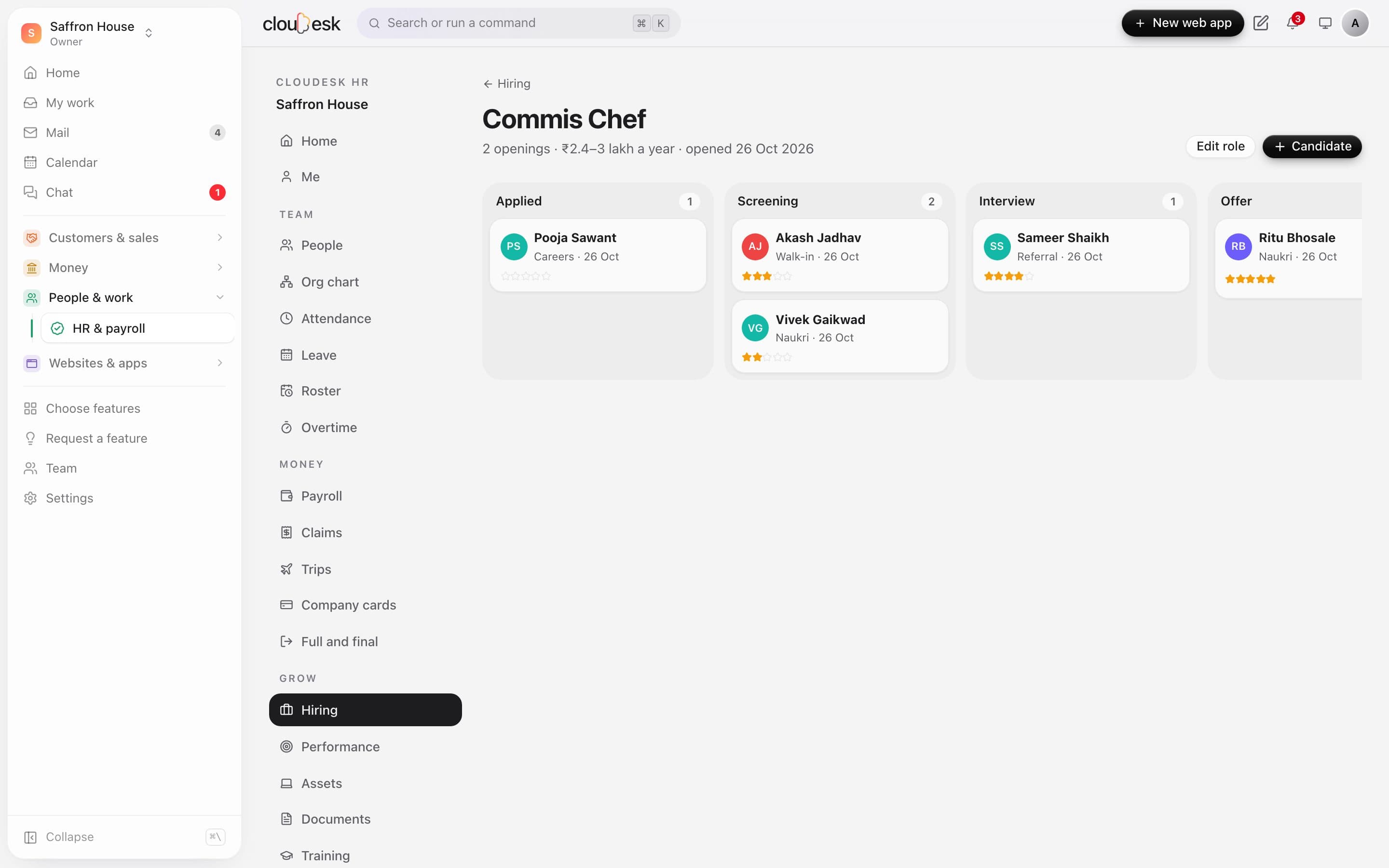
    Open a role and it appears on your public careers page with an apply form. Candidates land on a board from applied to offer; rate them, keep notes, and Hire turns them into an employee with their joining checklist.

    • A careers page with no website needed
    • Duplicate applications merged
    • Ratings and interview notes
    • Role closes when its openings are filled
    The candidate board for a Commis Chef role
  10. 10Performance

    Reviews that are fair by design.

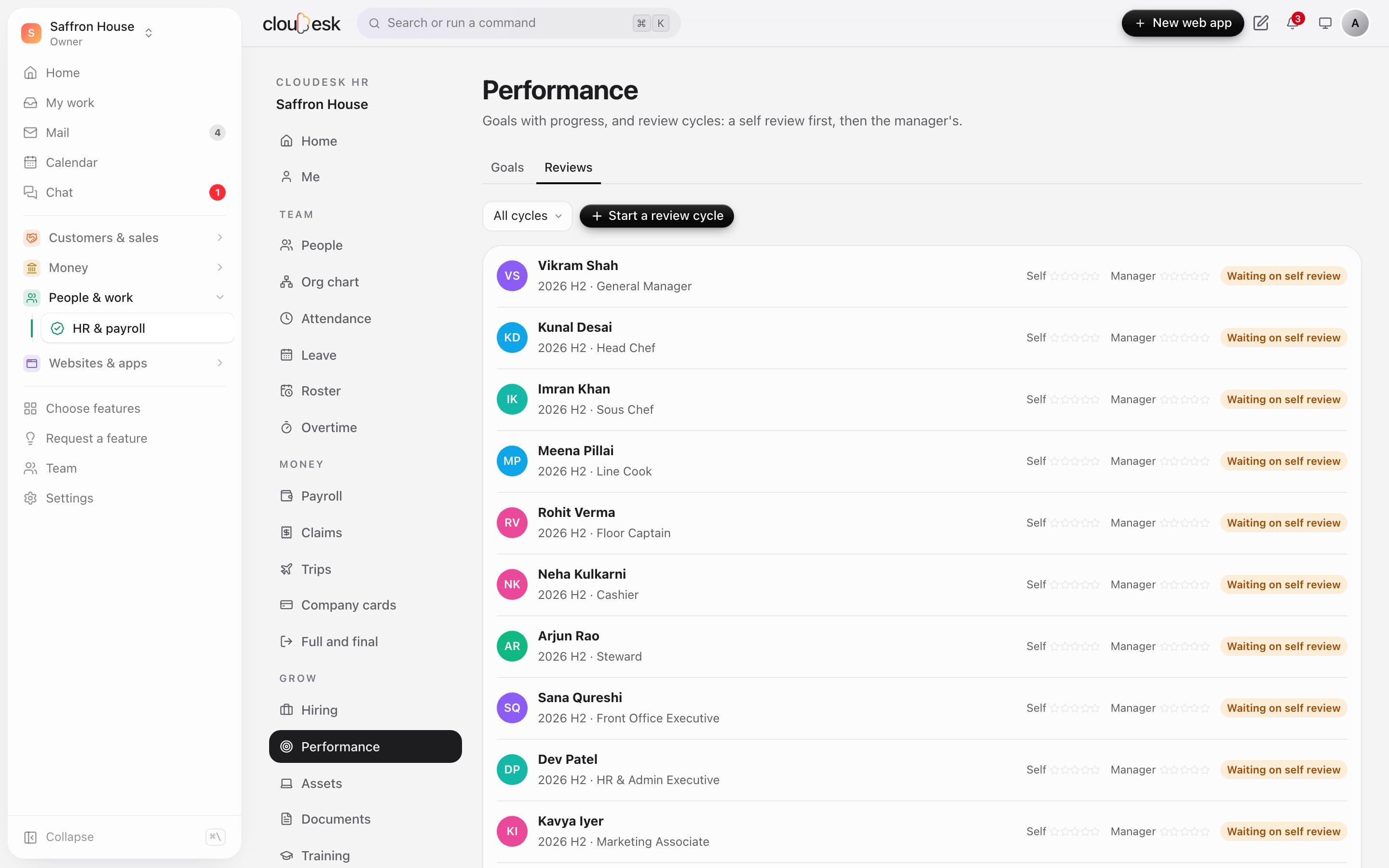
    Goals with progress, and review cycles where people rate themselves first and their manager second. The manager's rating stays hidden from the employee until the review is done.

    • Goals with progress
    • Self review, then manager
    • Review cycles like 2026 H2
    A review cycle with self and manager ratings
  11. 11Reports

    The numbers behind your team.

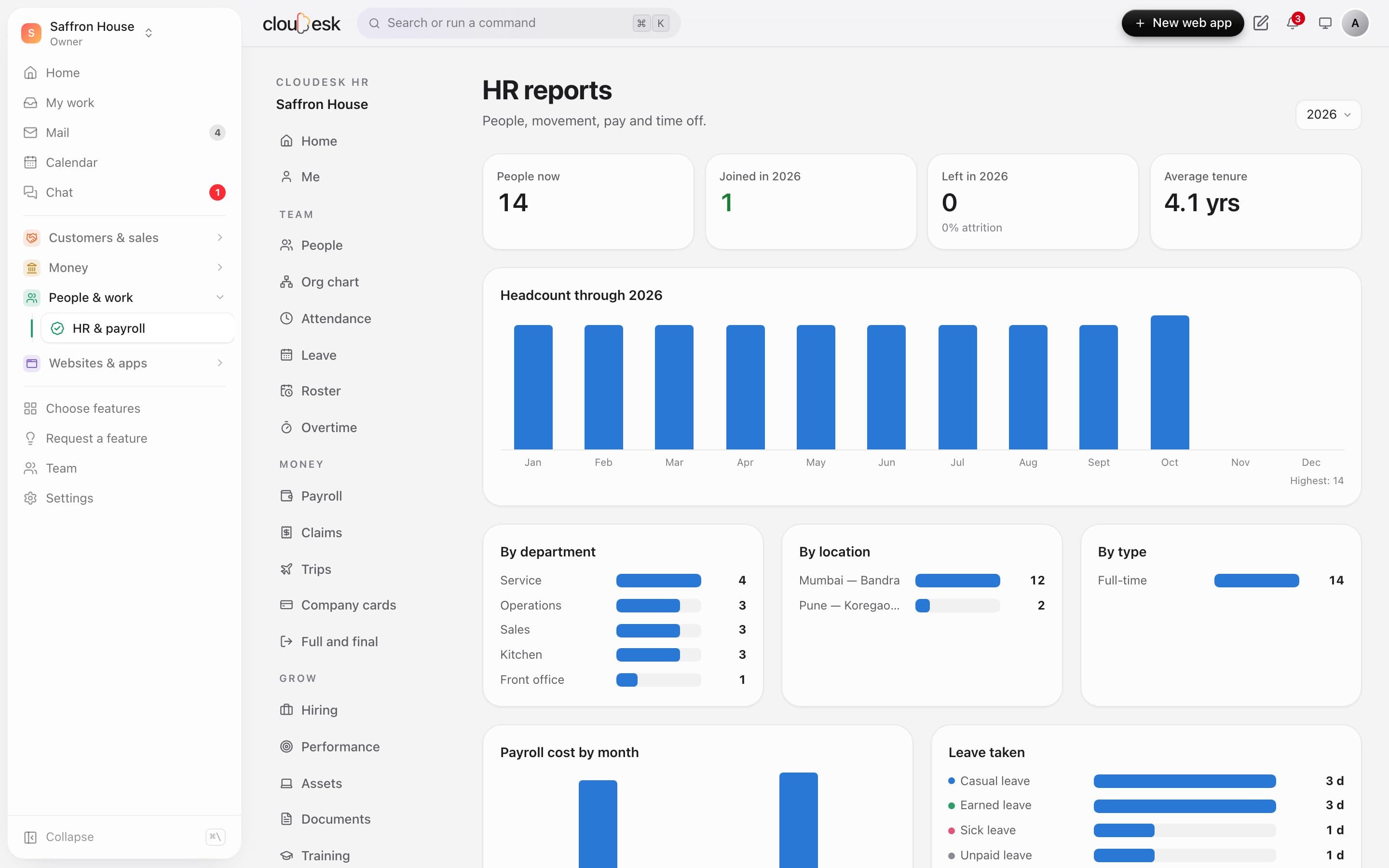
    Headcount through the year, joiners and leavers, attrition, average tenure, the team by department, location and type, payroll cost by month and leave taken.

    • Attrition and tenure
    • Payroll cost by month
    • Leave taken by type
    HR reports with headcount through the year and the team's make-up
  12. 12Your rules

    Set up for how you pay.

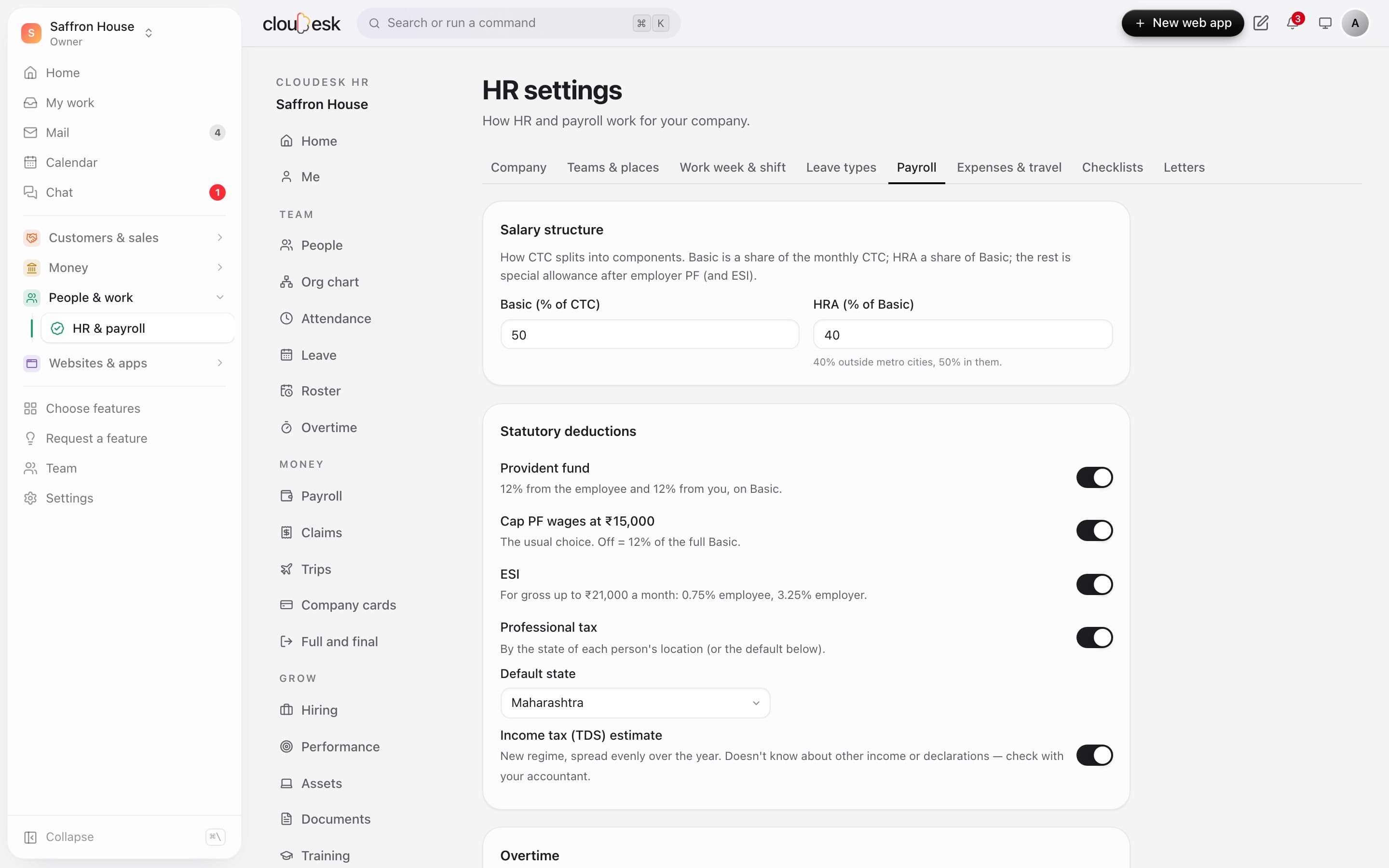
    Choose how CTC splits into Basic and HRA, whether PF is capped at ₹15,000, ESI, professional tax by state and the income-tax estimate. Shift times, work week, leave types, checklists and letter templates are yours too.

    • PF, ESI, professional tax and TDS switches
    • Professional tax for seven states
    • Your own letter templates
    Payroll settings: salary structure and statutory deductions

In detail

What you get with Cloudesk HR & payroll

Shifts, rosters and overtime

Plan the week's shifts (night shifts too); lateness is checked against the shift, and time past it is found at check-out, approved and paid through payroll at your overtime rate.

Good to know

We'd rather be upfront than surprise you later:

  • Income tax is an estimate under the new regime, spread evenly over the year. It doesn't know about other income, the old regime or investment declarations — check with your accountant before you file.
  • Cloudesk works out PF, ESI and professional tax, but doesn't file ECR returns or challans for you; use the register to file them.
  • The bank file is a CSV for your bank's bulk-upload screen. Cloudesk doesn't move money or connect to your bank.
  • Attendance is check-in from the web (and Horeca till unlocks). There's no biometric device, GPS or selfie check-in.
  • Trips are planned and approved here, but flights and hotels aren't booked from Cloudesk, receipts aren't read automatically, and card statements are imported from your bank's CSV or Excel file — there's no live card feed.
  • Employees only ever see their own pay, payslips and leave; managers see their team; salaries are visible only to owners, admins and billing.

Questions people ask

Do my staff need a Cloudesk account?+

Only if you want them to check in, apply for leave or see payslips themselves. Invite them with the Employee role and they see just their own HR space — not your projects, store or CRM.

Can I use it if I run a restaurant on Cloudesk?+

Yes. Bring your Horeca staff into HR in one click; when they unlock the till with their PIN, they're marked present for the day.

How is loss of pay worked out?+

Unpaid leave and absent days count fully, half days count as half. You can also choose to treat a working day with no check-in as absent. Salary is pro-rated for people who join or leave mid-month.

Can I change a payslip after payroll is worked out?+

Yes, while it's a draft: add a bonus or deduction, hold someone's salary, or recalculate after fixing attendance. Once finalised the numbers are locked.

Which states' professional tax is built in?+

Maharashtra, Karnataka, Gujarat, Telangana, Andhra Pradesh, West Bengal and Tamil Nadu, picked from each person's work location. You can switch professional tax off for other states.

Works beautifully with

Give it a spin — it's free to start.

Next up: Invoicing & Finance →

Start free